Closed beta

Booking software designed for movement studios. Built in Canada.

Predictable pricing. No platform surprises. Drop-ins, class packs, waitlists, and payouts — in a dashboard built for how you actually run class.

✓ First booking in under an hour✓ Paid out directly by Stripe✓ No per-student seat fees
🇨🇦 Ontario closed beta is live · expanding to more provinces & territories
Schedance×
schedance.net/dashboard
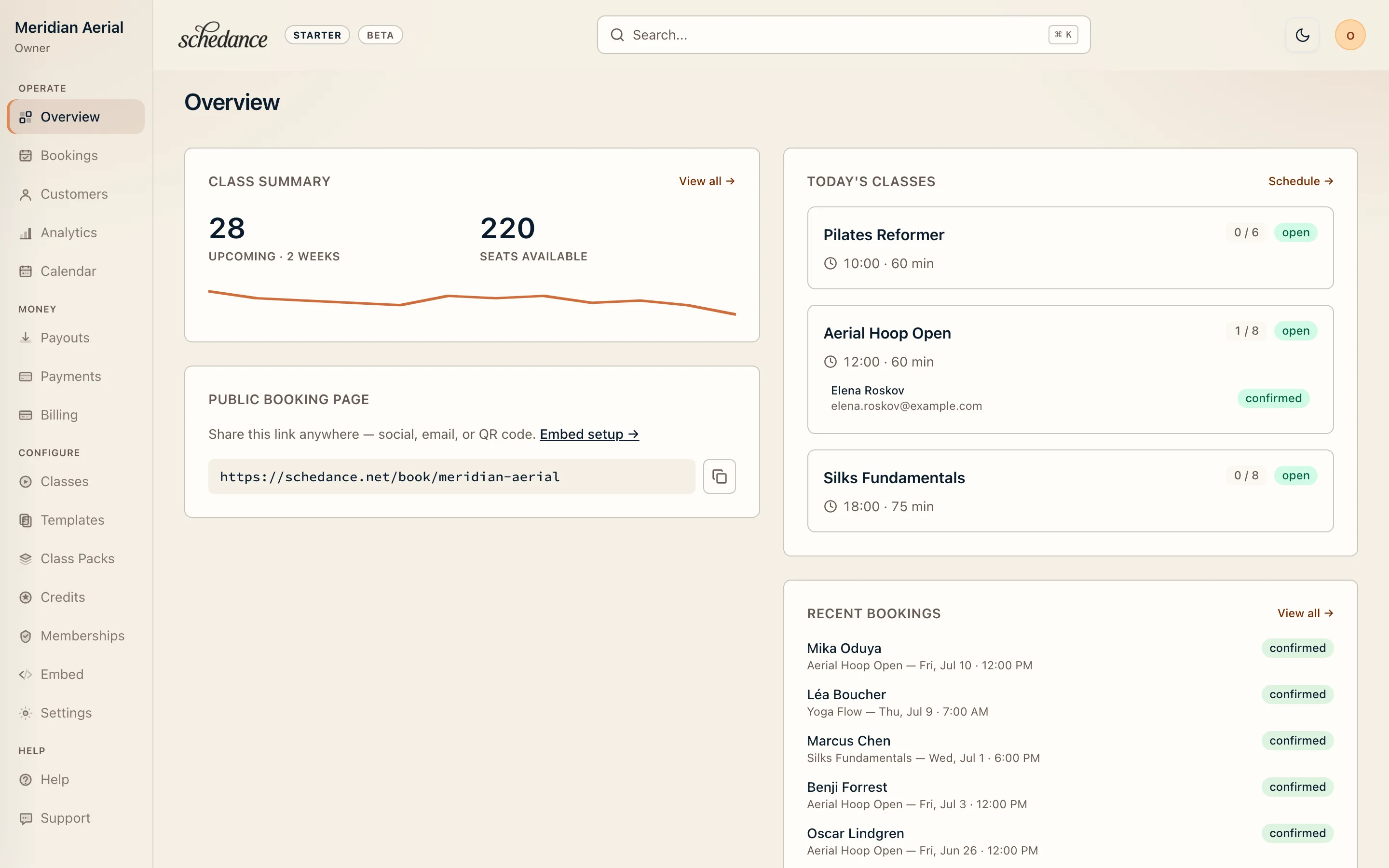
Schedance provider dashboard overview: class summary, today's classes, and recent bookings
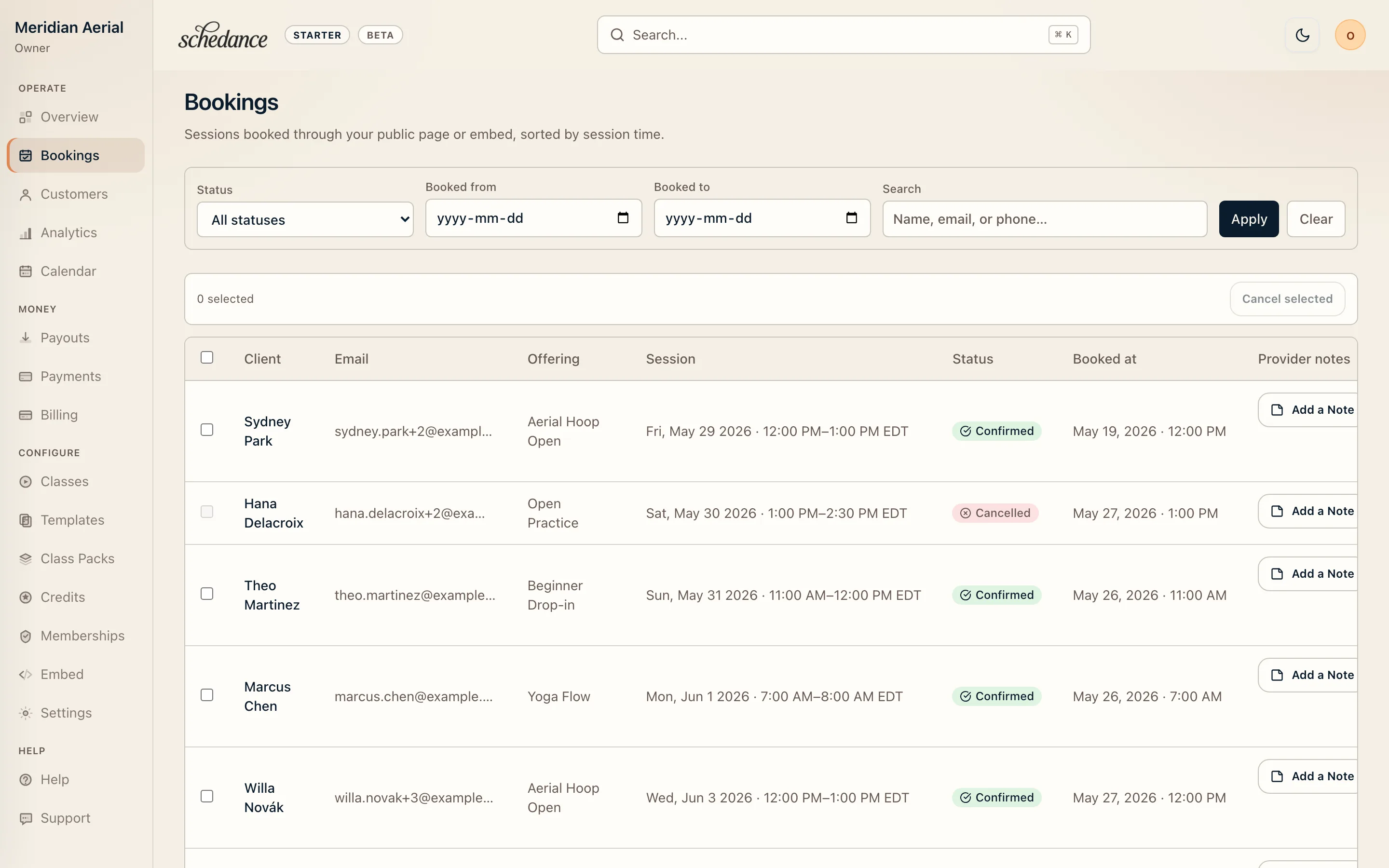
Schedance bookings table: confirmed sessions with client details and rescheduling controls
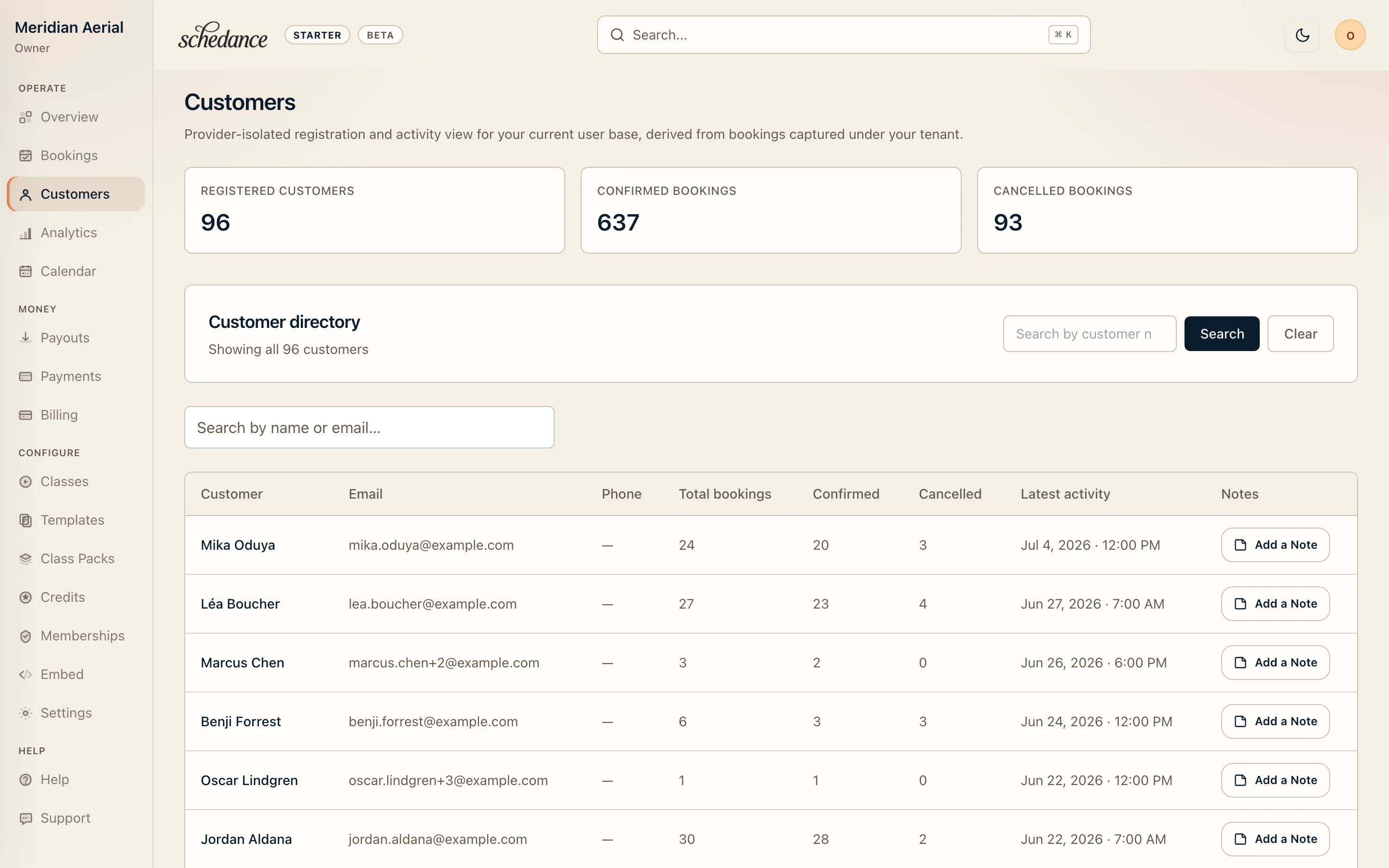
Schedance customers directory: per-student totals, confirmed and cancelled booking counts
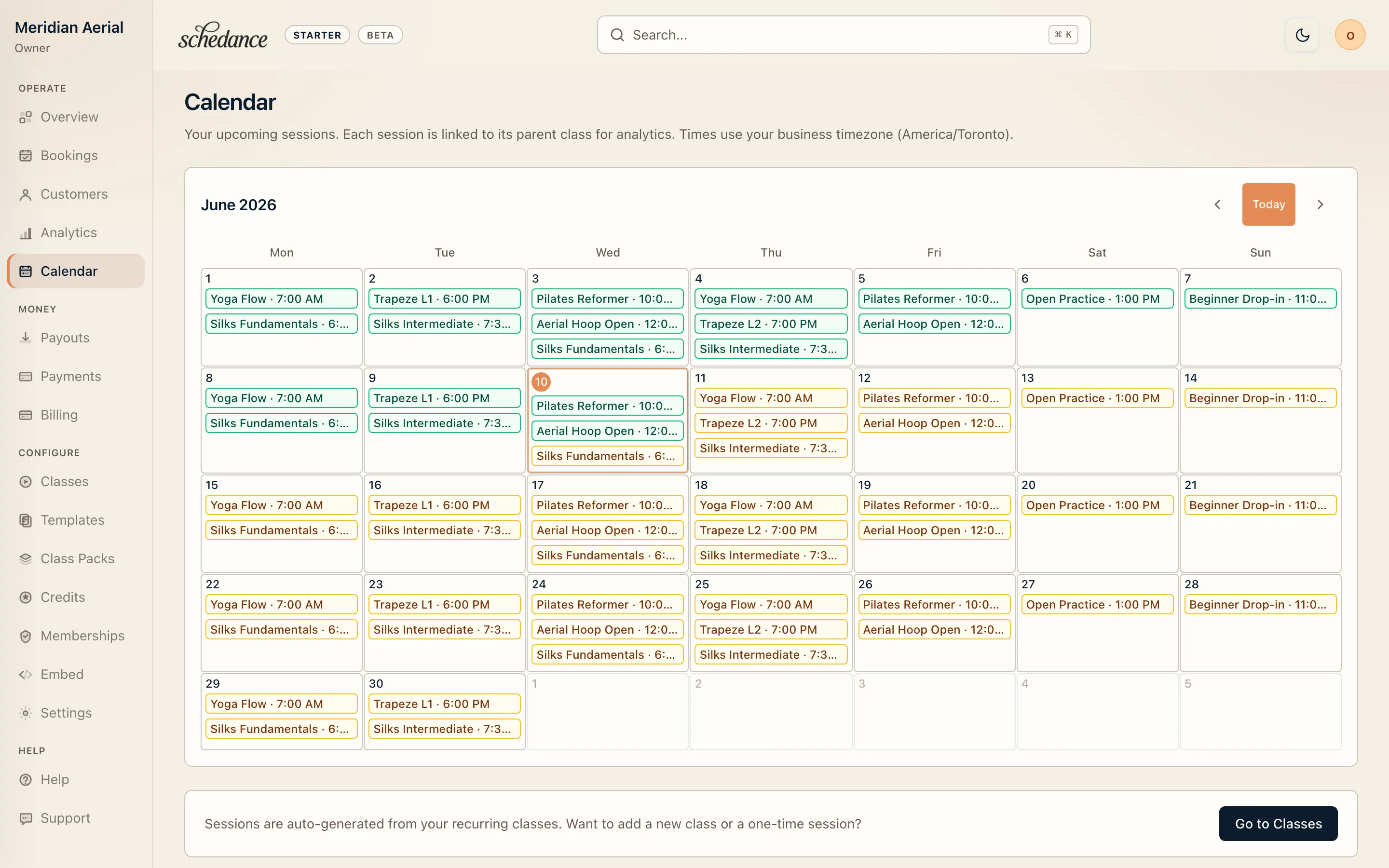
Schedance calendar view: month-at-a-glance of classes across every teacher
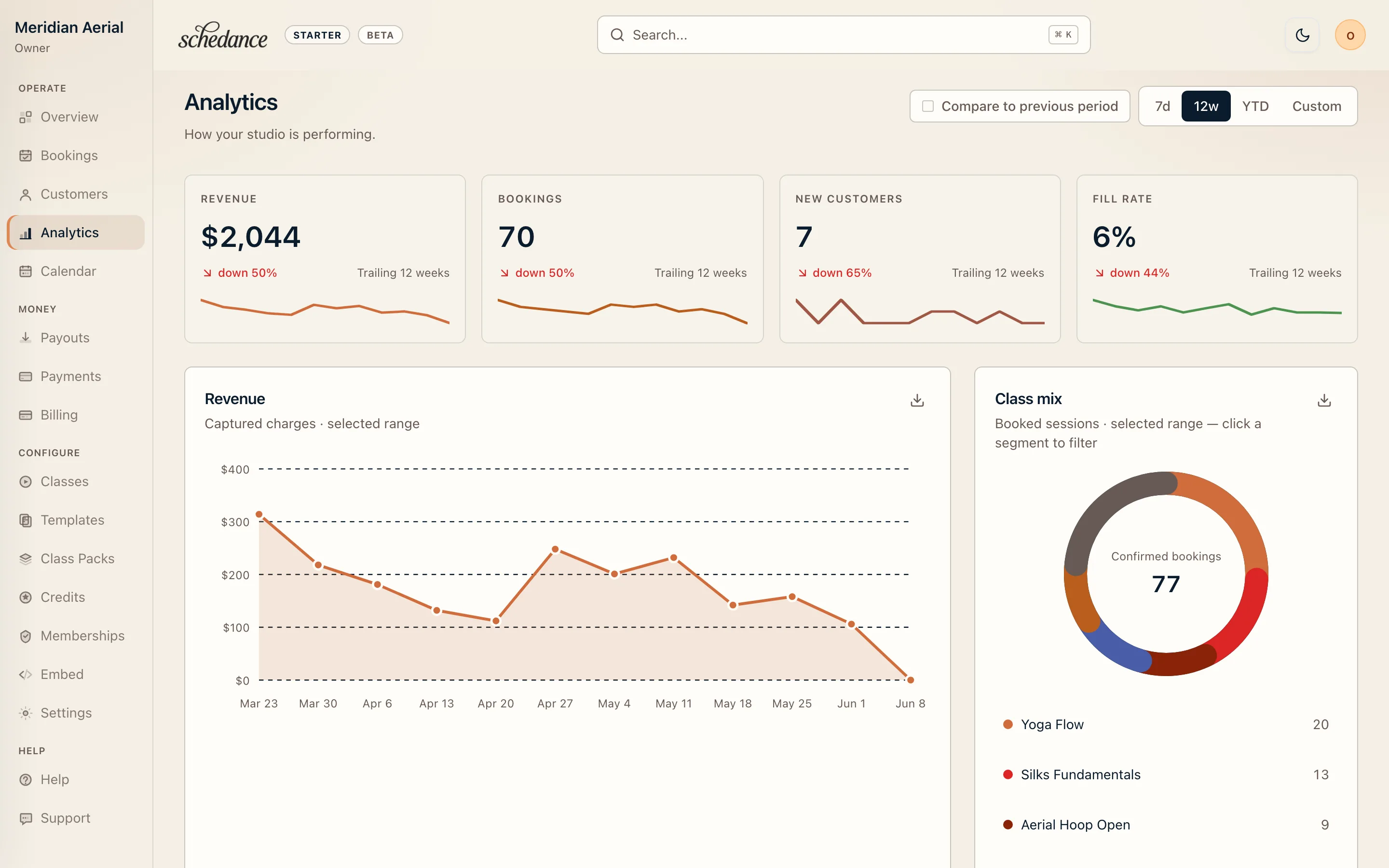
Schedance month-over-month analytics: KPI strip plus trailing twelve-month booking chart
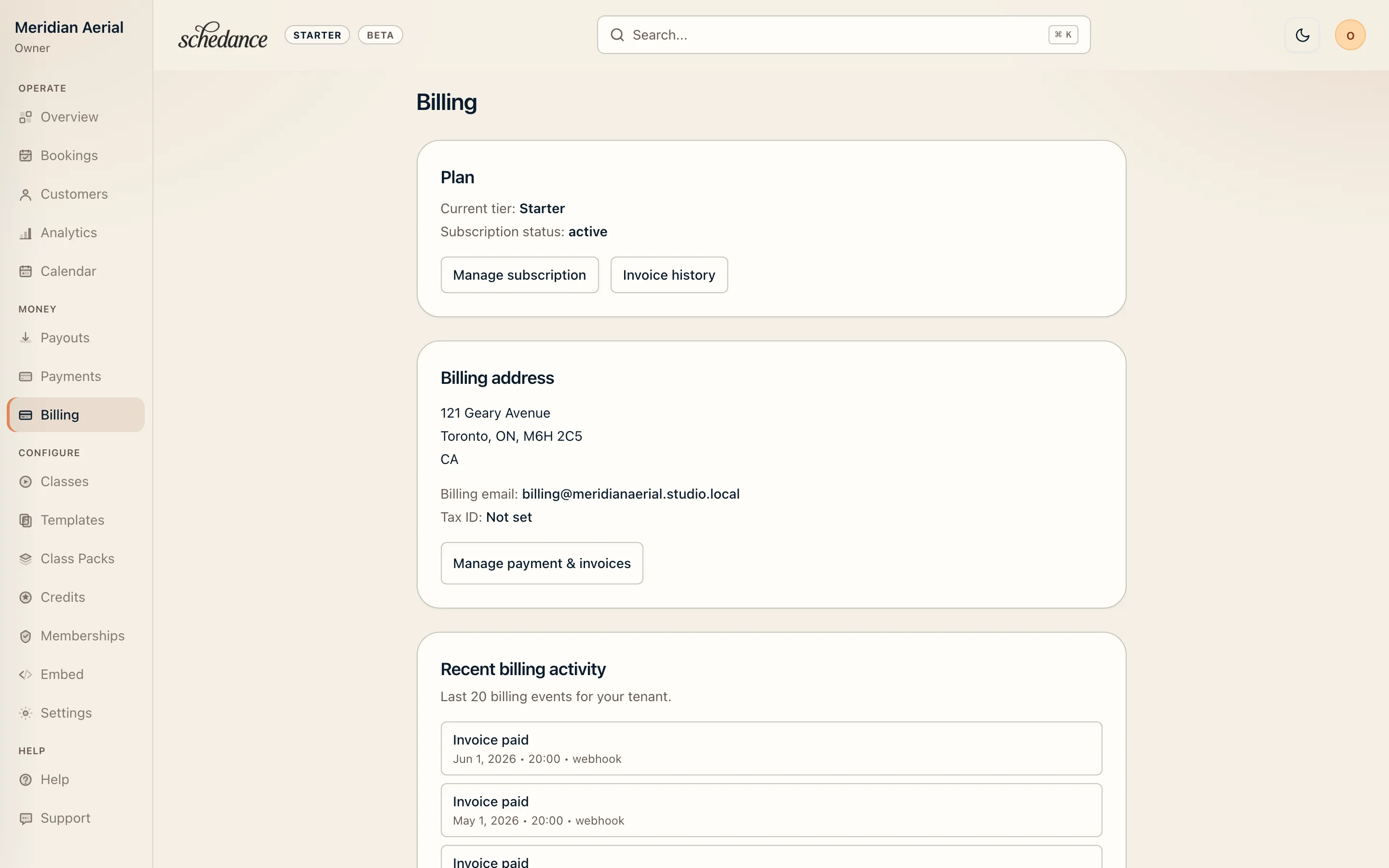
Schedance billing dashboard: subscription plan, payment method, and invoice history
Your studio at a glance — today's classes, revenue, and who's walking through the door
Walkthrough

A dashboard that moves at the pace of your studio.

01Step 01
See today, end-to-end, before you open the door.

One calendar view shows every class, instructor, room, and cancellation — with open drop-in slots and waitlist spillover flagged before class starts.

Schedance×
schedance.net/dashboard/schedule
Schedance provider dashboard overview: class summary, today's classes, and recent bookings
Schedance bookings table: confirmed sessions with client details and rescheduling controls
Schedance customers directory: per-student totals, confirmed and cancelled booking counts
Schedance calendar view: month-at-a-glance of classes across every teacher
Schedance month-over-month analytics: KPI strip plus trailing twelve-month booking chart
Schedance billing dashboard: subscription plan, payment method, and invoice history
02Step 02
Drop-ins, passes, and credits — all one flow.

Accept bookings from an embedded widget or direct link. Schedance handles class-pack consumption, credit ledgers, and overage pricing without a second tool.

Schedance×
schedance.net/dashboard/bookings
Schedance provider dashboard overview: class summary, today's classes, and recent bookings
Schedance bookings table: confirmed sessions with client details and rescheduling controls
Schedance customers directory: per-student totals, confirmed and cancelled booking counts
Schedance calendar view: month-at-a-glance of classes across every teacher
Schedance month-over-month analytics: KPI strip plus trailing twelve-month booking chart
Schedance billing dashboard: subscription plan, payment method, and invoice history
03Step 03
Know every regular, and every lapsed one.

The customer drawer shows attendance history, outstanding balances, and last-contact timestamps — so re-engagement is a single click, not a spreadsheet export.

Schedance×
schedance.net/dashboard/customers
Schedance provider dashboard overview: class summary, today's classes, and recent bookings
Schedance bookings table: confirmed sessions with client details and rescheduling controls
Schedance customers directory: per-student totals, confirmed and cancelled booking counts
Schedance calendar view: month-at-a-glance of classes across every teacher
Schedance month-over-month analytics: KPI strip plus trailing twelve-month booking chart
Schedance billing dashboard: subscription plan, payment method, and invoice history
04Step 04
Watch the trend, not just the day.

Month-over-month analytics surface where bookings are accelerating, where cancellations are creeping in, and which cohorts deserve a re-engagement push — without exporting a single spreadsheet.

Schedance×
schedance.net/dashboard/analytics
Schedance provider dashboard overview: class summary, today's classes, and recent bookings
Schedance bookings table: confirmed sessions with client details and rescheduling controls
Schedance customers directory: per-student totals, confirmed and cancelled booking counts
Schedance calendar view: month-at-a-glance of classes across every teacher
Schedance month-over-month analytics: KPI strip plus trailing twelve-month booking chart
Schedance billing dashboard: subscription plan, payment method, and invoice history
Live demo

Booking widgets that live where your students are.

Embed it on your site, drop it in your link bio, or share the link. Two layouts, and as many embeds as you need — all set up in your dashboard. Both demos below are the real, live widget running on a sample studio — go ahead and click around; nothing you enter is saved.

Make it yours →
Custom
Brand colours are a Starter-and-up feature — try them free here.
01Layout 01
Compact List — your whole schedule in a tidy column.

The default layout on every plan. A dense, scannable list of upcoming classes with day filters, live spot counts, and one-tap checkout. Drop it into any iframe-friendly site — try it on the left; it is the same flow your students see.

Lives anywhere an iframe does.

One embed line drops into WordPress, Squarespace, Webflow, Wix, Notion, or your link-in-bio. No plugin to install, no page-builder block to maintain, no DNS to edit.

Fast and self-contained.

No page-builder plugin and no third-party tracking pixel you didn't approve. Your students can book without ever leaving your site.

Your brand, front and center.

Show your logo and studio name, set your brand colours on Starter and up, or strip it all back with the hide-logo and hide-studio-name toggles — and no Schedance logo or badge on your paid embed.

02Layout 02
Featured Grid — make this week's classes the centerpiece.

An editorial layout that sells the class.

Every class becomes a card — day, time, instructor, price, and live availability at a glance. Built for drop-in discovery, where browsing beats scrolling a list.

Week or day, your call.

Show the whole week as a grid, or focus students on a single day with day-to-day paging. Tune the columns and rows to match how busy your schedule is.

Same snippet, set in your dashboard.

Switch from Compact List to Featured Grid in your dashboard — the embed code on your site never changes. Featured Grid is a Starter-and-up layout; Hobby embeds use Compact List.

In practice

Made for how movement classes actually run.

Not office software with a class schedule glued on. Schedance is built from the floor up for studios where bodies, equipment, and attention all matter.

  • Any modality. Aerial silks, pole, lyra, contemporary, ballet, Pilates, mat work, floor — the booking flow doesn't care which.
  • Any space. Brick-and-mortar studios, festival rigs, outdoor pop-ups, retreats and intensives.
  • Any cadence. Drop-ins, packs, courses, privates, recurring series — all on one schedule.

Aerial silks, outdoors. Schedance handles the scheduling, payment, and reminders that get your students here — then stays invisible so the class can be the class.

Aerial silks training session — one student suspended in a split, the other spotting from the mat below.
Pricing

Pricing that protects your margin.

One subscription plus a small platform fee on each paid booking — no per-user seats, no hidden markups. How fees work →

Hobby
$0
/mo
Free for getting started. A seed tier for low-volume instructors who graduate to Starter as bookings grow.
  • Up to 100 students, 15 classes/mo
  • Embeddable booking widget (Compact List layout)
  • Drop-in bookings
  • Email reminders
  • Booking history
  • Community support (forum + docs)
5% Schedance platform fee + 10¢ per booking (free classes are $0) + Stripe processing (typically 2.9% + 30¢ for Canadian cards; rates vary by card type). Hobby caps and platform-fee structure may be adjusted as Schedance evolves; existing users get advance notice of any material change in accordance with our Terms of Service — How fees work →
Join the waitlist
Most popular for new studios
Starter
$15
/mo
For solo instructors and small studios charging per class.
  • Up to 500 students, 50 classes/mo
  • Embeddable booking widget — Compact List + Featured Grid layouts, custom logo + brand colour
  • Drop-in bookings + class packs
  • Credits ledger
  • Waitlists with email alerts
  • Cancellation policies (refund rules)
  • Calendar sync (iCal, Google)
  • Basic revenue reporting
  • Standard email support (48h)
1.75% Schedance platform fee per booking + Stripe processing (typically 2.9% + 30¢ for Canadian cards; rates vary by card type) — How fees work →
Request early access
Studio
$45
/mo
For growing studios with regulars.
  • Everything in Starter, plus:
  • Unlimited students and classes
  • SMS reminders to students (500/mo, $0.02 overage)
  • SMS waitlist + cancellation alerts
  • 5 instructor / team seats
  • Custom-branded transactional emails
  • Bulk student actions + saved segments
  • Priority email support (24h response)
  • Advanced reporting (LTV, churn, segments) — coming soon
1% Schedance platform fee per booking + Stripe processing (typically 2.9% + 30¢ for Canadian cards; rates vary by card type) — How fees work →
Request early access

Trial does not include SMS features.

Community
Custom
For multi-location studios and partner networks.
  • Everything in Studio, plus:
  • Unlimited team seats
  • Effectively unlimited SMS
  • Multi-location scheduling
  • Multi-instructor commissions + splits
  • White-label + branded domain
  • Migration assistance + dedicated account rep
  • Priority onboarding + SLA
From 0.5% Schedance platform fee per booking + Stripe processing (typically 2.9% + 30¢ for Canadian cards; rates vary by card type) — How fees work →
Talk to the team
Waitlist

Public launch opens in waves.

Drop your email and studio and we'll send a private onboarding link when your region opens up. No marketing, no cadence — just the launch.

Questions we keep getting.

No. Every fee Schedance and Stripe charge is disclosed on our pricing page. There are no setup fees, no monthly seat fees beyond the subscription, and no surprise markups.
Stripe processes every payment and charges their own processing fee on top of the Schedance platform fee. For Canadian cards, Stripe's rate is typically 2.9% + 30¢ per transaction — though the exact rate can vary by card type (international cards, business cards, and prepaid cards may differ). You see the full picture on the How fees work page.
Schedance currently partners with Stripe to handle studio payments. We're evaluating additional processor options for post-launch — your studio will be able to choose the one that works best for your business.
When a booking is refunded, the student receives the full amount they paid. Schedance waives its platform fee on full refunds — you only bear the Stripe processing cost, which Stripe does not return on refunds.
Open launch is staged by region. Every waitlist signup gets notified the week their cohort opens. Early partners keep their pilot rates through the transition.
Hands-on migration help is available for early partners. Automated importers for the most common platforms are in development and will land in a post-launch release.
The embeddable widget is lightweight and there is no transaction-volume cap on any plan. Studio and Community are uncapped on students and classes. Hobby is capped at 100 students / 15 classes per month, and Starter is capped at 500 students / 50 classes per month — see the plan comparison above for details.
Hobby is the seed tier — free to start while you're trying Schedance with low volume. Most studios graduate to Starter within their first few months as bookings grow; the per-booking 10¢ floor is what makes Hobby's economics work without a subscription. Hobby caps and platform-fee structure may be adjusted as Schedance evolves; existing users get advance notice of any material change in accordance with our Terms of Service.
Schedance

Book the class. Run the studio. Close the laptop.

Early access opens by region. Get on the list, or try the student booking widget live.